Administration
Everything that sets hookinlet up or looks after it: creating inboxes, changing their settings, issuing and revoking tokens, retention, and backups. There are two ways in and they do the same things:
- the admin API, on a running server, with the admin token;
- the command line, which calls that API when you give it
--url, and otherwise works directly in the data directory.
Who may do this
The admin API accepts only the admin token (HOOKINLET_ADMIN_TOKEN, set when the
server starts). An agent token gets 403, a missing or wrong token gets 401,
and neither can tell what is behind the path. The admin token can read every
inbox and change everything, so treat it like a root password: keep it in the
environment, never in a flag, and use TLS in front of the server. The server
will not start with one shorter than 32 characters or one that is mostly
repetition; openssl rand -base64 32 makes a good one.
Every admin action is logged ("msg":"admin") with what was done and the
caller's address (client_ip; behind a proxy, set --trusted-proxies so that
it is the caller and not the proxy). Tokens and secrets are never logged.
Keeping the admin API off the public address
The admin API is on the same address as ingest by default. Two settings take it off the internet:
--admin-listen-addr 127.0.0.1:9090serves it on its own address and nowhere else; the public address answers404for/v1/admin/..., and the admin address answers404for everything that is not admin. This moves the admin API; the admin token still reads every inbox through the read API and MCP on the public address, so keep it as secret as before and give agents their own tokens. Reach it over an SSH tunnel, a private network, or a proxy that you control. (In a container, bind it to an address the container publishes only where you mean to.)--admin-enabled=falseturns it off altogether. Inboxes and tokens are then managed with the command line, which works in the data directory.
Responses are JSON, never cached (Cache-Control: no-store), and errors use the
same shape as the rest of the API: {"error": {"code": "…", "message": "…"}}.
Nothing here ever returns a verifier secret, the sealed form of one, or a token
hash. An inbox shows only has_verifier_secret: true. The one thing that is
shown exactly once is a new agent token, in the response that creates it.
The API
| Method and path | Purpose |
|---|---|
POST /v1/admin/inboxes |
Create an inbox. Returns its first agent token (named default) once. |
GET /v1/admin/inboxes |
List inboxes, 100 at a time by default and at most 1000 (?limit=; follow next). |
GET /v1/admin/inboxes/{slug} |
Show one, with its message count. |
PATCH /v1/admin/inboxes/{slug} |
Change settings. |
PUT /v1/admin/inboxes/{slug}/secret |
Set or replace the verifier secret. |
POST /v1/admin/inboxes/{slug}/rotate-ingest-key |
A new random ingest key. The old URL stops working at once; give senders the new one. |
DELETE /v1/admin/inboxes/{slug} |
Delete the inbox and all of its messages (204). The inbox is gone as far as readers, senders and tokens are concerned the moment the call starts; its messages are then removed in small batches so that other inboxes keep receiving. If the server stops part way, the retention sweep finishes the job (hookinlet retention run does it at once, and is the way to do it if the sweep is off); until then the slug and ingest key are still taken. |
POST /v1/admin/tokens |
Issue an agent token for some inboxes (inboxes: a list of slugs) or all of them (all_inboxes). Returns the token once. |
GET /v1/admin/tokens |
List tokens, never their secrets (?inbox=slug for those that can read an inbox; ?limit=; follow next). |
DELETE /v1/admin/tokens/{id} |
Revoke a token (204). It stops working at once. |
POST /v1/admin/retention/run |
Apply retention now. Returns {"deleted": N}. |
GET /v1/admin/backup |
Download a consistent copy of the database. |
GET /metrics |
Prometheus metrics (see deploying). |
Request bodies are JSON (Content-Type: application/json, else 415), at most
64 KiB (else 413), and strict: an unknown field, or anything after the JSON
value, is a 400 rather than being ignored.
Other statuses: 404 for an inbox that does not exist, 409 when a slug or an ingest_key is taken
or a change could not be settled (or a sweep or backup is already running),
501 when a verifier secret is given but no master key is configured, or the
Store cannot make backups.
The examples below write $BASE for the server's address (export BASE=http://localhost:8080)
and $HOOKINLET_ADMIN_TOKEN for the admin token.
Create
curl -s -X POST "$BASE/v1/admin/inboxes" \
  -H "Authorization: Bearer $HOOKINLET_ADMIN_TOKEN" -H "Content-Type: application/json" \
  -d '{"slug": "stripe-api", "verifier": "stripe", "verifier_secret": "whsec_example",
       "retention_days": 30, "event_type_pointer": "/type"}'
{
"inbox": {
"id": 1, "slug": "stripe-api", "name": "stripe-api", "version": 1,
"verifier": "stripe", "verifier_config": {}, "has_verifier_secret": true,
"on_verify_fail": "reject", "max_body_bytes": 1048576,
"retention_days": 30, "retention_max_count": 0, "event_type_pointer": "/type",
"disabled": false, "last_seq": 0,
"ingest_key": "q3V9xR1hT0kYz2mP8uWb6A",
"ingest_path": "/in/q3V9xR1hT0kYz2mP8uWb6A",
"ingest_url": "https://hooks.example.com/in/q3V9xR1hT0kYz2mP8uWb6A",
"created_at": "…", "updated_at": "…"
},
"agent_token": "hki_…"
}slug (3 to 64 characters from a-z, 0-9, and -; it never changes) and
verifier are required. There is no default verifier: say how deliveries are
checked, or none to accept anything unchecked (stored as not verified). The
other fields are ingest_key, name, verifier_config, verifier_secret, on_verify_fail (reject or store),
max_body_bytes (default 1 MiB, at most 10 MiB), retention_days,
retention_max_count, and event_type_pointer. The verifier and its
configuration are checked when you save them, so a typo is an error now and not
a failed delivery later. See verifiers.
Retention and the clock. Retention by age (retention_days) trusts the server's clock. If the clock
jumps forward between two retention runs (a resumed VM, a wrong time read before it is corrected), a run
that trusted it would delete messages that are not yet due. A run that finds the wall clock more than ten
minutes ahead of the time that really passed uses the time that really passed instead, and logs a
warning; the next run takes the clock as it then reads, so a clock that stays where it jumped is the
clock. Retention by count is not affected. A server whose clock is wrong for good should have its clock fixed.
A verifier that needs a secret, created without one, comes with a warnings
entry: deliveries fail until you set it. The same warning comes back from any
change that leaves an inbox in that state.
The ingest key is the {key} in the inbox's ingest URL, and it is a
capability: whoever has it can post to the inbox. So it is random by default
(128 bits), and not the slug. You may choose one (ingest_key, 3 to 64 characters
from letters, digits, _ and -) when a readable URL matters more than it being
unguessable. rotate-ingest-key replaces it; messages stay where they are. Why it is not
just the slug is explained below.
ingest_url is built from HOOKINLET_PUBLIC_BASE_URL if set, and otherwise from
the request's Host (using X-Forwarded-Proto only when the request came from
one of HOOKINLET_TRUSTED_PROXIES).
Change settings
PATCH takes any of name, verifier, verifier_config, on_verify_fail,
max_body_bytes, retention_days, retention_max_count, event_type_pointer,
and disabled. Omitted fields are left alone. A disabled inbox answers
deliveries with 404 while agents can still read what it holds.
Each change is checked against the inbox's version, so two admins changing
different settings of the same inbox at once both take effect; for the same
setting the last one wins. A conflict that cannot be settled is a 409 to retry.
retention_days is at most 36,500 (a hundred years).
The verifier secret and the token
PUT …/secret takes {"secret": "…"}. The secret is sealed with the master key
before it is stored (see HOOKINLET_MASTER_KEY) and cannot be read back.
Tokens
An agent token is a name, a secret that is shown once, and what it may read: a
list of inboxes (up to 100) or all of them, those created later included. An
inbox can have any number of tokens. Creating an inbox issues its first, named
default.
To replace a token, issue the new one, give it to the agent, and then revoke the old one. Both work in between, so the agent never has a moment with none. Revoking is also the remedy for a leaked token: the revoked token is refused at once, and open SSE streams and MCP waits that used it end within about 30 seconds. Deleting an inbox revokes the tokens that read only that inbox and leaves the rest.
curl -s -X POST "$BASE/v1/admin/tokens" \
  -H "Authorization: Bearer $HOOKINLET_ADMIN_TOKEN" -H "Content-Type: application/json" \
  -d '{"name": "billing-agent", "inboxes": ["stripe-api"]}'
# → {"record": {"id": 2, "name": "billing-agent", "all_inboxes": false, "inboxes": ["stripe-api"], …}, "token": "hki_…"}
A token for several inboxes names each slug, and one that reads everything says
"all_inboxes": true instead. Naming neither, or both, is a 400; so is
naming an inbox that does not exist (404). The name is for people: it need not
be unique and is not a secret.
An agent token can never use the admin API, however many inboxes it reads.
Why the ingest URL is not the slug
The ingest endpoint takes requests from anywhere, and the key in the URL is the
only thing that says which inbox a request is for. A slug is a name you chose so
that people can tell inboxes apart (stripe, github, billing), which makes it
the first thing anyone would try. A guessed URL gets less than it looks like: on
an inbox with a real verifier a request without a valid signature is refused and
stores nothing. But it still gets something:
- It finds out what exists. An unknown name is a
404and a known one a401, so a scanner learns which inboxes you have, and that this is hookinlet. - It can fill a
noneinbox. An inbox that checks nothing accepts whoever finds it. What it takes is stored as not verified, but it is still stored, and count-based retention then pushes real messages out. - It learns how busy you are. Every accepted post answers with the next
seq.
A random 128-bit key closes all three: there is nothing to guess, an unknown key
and a wrong one look the same, and the signature is left to do what only a
signature can, which is to say who sent the request. The cost is a URL nobody
can remember, which is why the admin API and inbox show print it and why
ingest_url is built for you. If a readable URL matters more to you, choose one
with ingest_key; you are then trusting the signature alone.
The key is a secret of the same kind as a webhook URL on a chat service: keep it
out of public places, and rotate it (rotate-ingest-key) if it leaks. Messages
stay where they are.
The console
The server also serves a web console at /admin, on the same listener as the admin API (or on
HOOKINLET_ADMIN_LISTEN_ADDR, if the admin API has its own). It is a page that calls the admin
API with the admin token: you type the token to sign in, and it stays in the page's memory until
you sign out or close the tab. It is on by default; HOOKINLET_ADMIN_UI=false turns it off, and it
is absent whenever the admin API is. The page and its scripts are static files built into the
binary; they are served under a content security policy that allows no inline script and no other
origin, and message content is always shown as text. It has an overview (inboxes, activity over the last day, the last retention run), a list of inboxes, an inbox page
with its messages (filter by event type, verification and time; read a message's body, headers and exact bytes;
follow new ones as they arrive), and a page to issue and revoke agent tokens; it follows the system's light or dark theme, which can be switched from its sidebar.
Its settings are in the console too: creating an inbox picks the sender and asks only for what that sender needs, an
inbox's page has a Settings tab (name, retention, verification, replacing its secret, rotating its ingest URL, and
deleting it after typing its name), and a Maintenance page runs retention and downloads a backup. ⌘K (or Ctrl K)
opens a command palette to go anywhere or do anything by name.
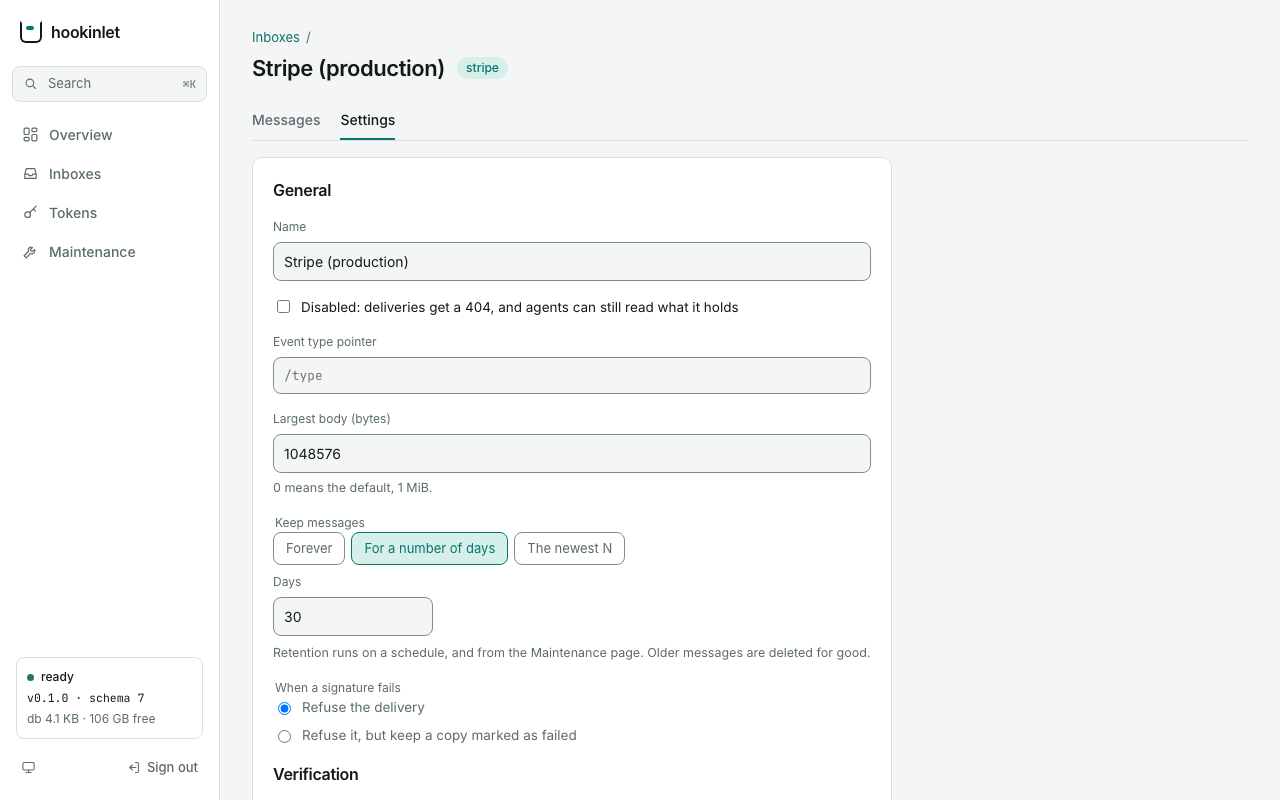
It adds no new way to change anything: whatever
it does goes through the endpoints in this document. GET /v1/admin/status is the one endpoint it
needed that did not exist (version, schema, database size, free space, last retention run).
The command line
# against a running server (HOOKINLET_ADMIN_TOKEN holds the admin token)
export HOOKINLET_URL=https://hooks.example.com
hookinlet inbox create --slug stripe-prod --verifier stripe     # secret: HOOKINLET_VERIFIER_SECRET (the verifier is required)
hookinlet inbox list
hookinlet inbox show stripe-prod
hookinlet inbox update stripe-prod --retention-days 30 --disabled=false
echo whsec_example | hookinlet inbox set-secret stripe-prod --secret-stdin
hookinlet token create --name billing-agent --inbox stripe-prod
hookinlet token list --inbox stripe-prod
hookinlet inbox rotate-ingest-key stripe-prod
hookinlet inbox delete stripe-prod --yes
hookinlet retention run
hookinlet backup --out hookinlet-backup.db
To retire a token, look up its ID and revoke it:
hookinlet token list --inbox stripe-prod
hookinlet token revoke 2
Without a server, straight in the data directory (also for first-time setup). If HOOKINLET_URL is set in
your shell, unset it first: giving both a server address and a data directory is an error.
unset HOOKINLET_URL
hookinlet inbox create --slug stripe-prod --verifier stripe --data-dir ./data- Which mode.
--url(orHOOKINLET_URL) selects the API and requires the admin token inHOOKINLET_ADMIN_TOKEN. Without it the commands open--data-dir(HOOKINLET_DATA_DIR, default./data). Passing both--urland--data-diris an error. - Secrets are never flags. A verifier secret comes from
HOOKINLET_VERIFIER_SECRETor, forset-secret,--secret-stdin, and sealing it in direct mode needsHOOKINLET_MASTER_KEY. The admin token comes from the environment;--tokenexists but shows up in process listings. - Direct mode needs a database. Every command but
inbox createrefuses a data directory with nohookinlet.db, so a mistyped--data-diris an error and not an empty list or a backup of nothing. - Plain
http://to another machine is refused, because it would send the admin token in the clear.--insecure-httpoverrides that on a network you trust;http://localhostis always fine. Redirects are not followed. --jsonprints the server's answer as JSON for scripts.- Direct mode and a running server can be used at the same time: the database is safe to share, and the version check covers a change that lands between a command's read and its write.
Applying a file
hookinlet apply -f inboxes.yaml brings a server's inboxes to the state a file
describes, so that a setup can be kept in version control and repeated. It
reaches the data the same way the other commands do (--url and the admin
token, or --data-dir), and it only ever uses the admin API's own operations
and rules.
export HOOKINLET_URL=https://hooks.example.com          # and HOOKINLET_ADMIN_TOKEN, as above
export STRIPE_WEBHOOK_SECRET=whsec_example              # the secret stays out of the file
export DEPLOY_EVENTS_TOKEN=made-up-shared-token

cat > inboxes.yaml <<'EOF'
inboxes:
  - slug: stripe-live
    name: Stripe (production)
    verifier: stripe
    secret_env: STRIPE_WEBHOOK_SECRET
    verifier_config: { tolerance_seconds: 300 }
    retention_days: 30
    event_type_pointer: /type
  - slug: deploy-events
    verifier: token
    secret_env: DEPLOY_EVENTS_TOKEN
    retention_max_count: 50000
EOF

hookinlet apply -f inboxes.yaml --tokens-out tokens.json --dry-run   # says what it would do; changes nothing
hookinlet apply -f inboxes.yaml --tokens-out tokens.json             # does it
hookinlet apply -f inboxes.yaml                                      # again: nothing to create or change
The second command prints:
created           stripe-live
secret set        stripe-live
created           deploy-events
secret set        deploy-events

2 created, 0 updated, 0 unchanged, 2 secrets set, 0 not managed
agent tokens of the new inboxes were written to tokens.json
The third prints unchanged for both inboxes, secret set for both, and no
created lines.
The file. One key, inboxes, a list. An entry is identified by its slug
(3 to 64 characters from a-z, 0-9, and -; it never changes). A new inbox
also needs a verifier (none is a choice, and a delivery it accepts is stored as
not verified); an inbox that exists keeps its own if the file says nothing. The other keys are the admin API's fields, with the same names
and the same rules, because the same code checks them: name, verifier,
verifier_config, on_verify_fail, max_body_bytes, retention_days,
retention_max_count, event_type_pointer, and disabled. ingest_key may be
declared for a new inbox (leave it out to get a random one, which is what an inbox
should have); apply does not change the key of an inbox that exists. max_body_bytes
cannot be 0 here: leave it out to get the default.
Secrets are never in the file. A literal secret (secret: or
verifier_secret:) is an error. Name where to read it from instead, with one of:
secret_env: NAME, an environment variable of the process runningapply;secret_file: /path, a file (such as a mounted secret). Trailing newlines are not part of the secret. A file larger than 4,096 bytes is refused.
Giving both is an error, and so is a source that is missing or empty (the message points at the line of the key and does not repeat the variable name or the path, because a secret pasted under the wrong key would look like one). Secrets are never printed or logged.
What apply does. For each entry, in order:
- If the inbox does not exist, it is created, with its secret and its agent token. Settings the file leaves out take the server's defaults.
- If it exists, only the settings that differ from the file are changed (one
PATCH), and settings the file leaves out are left alone (a key with no value, such asretention_days:, is an error and not a zero: leave the key out), so changes made by hand to those survive.event_type_pointer: ""is a setting too: it clears the pointer.verifier_configis compared by meaning, not spelling. - A verifier secret cannot be read back, so there is no telling whether it has
drifted. When an entry names a secret source, the secret is set again on every
run, and the summary says
secret set. That changes nothing else about the inbox.
apply never deletes an inbox or a message. Inboxes on the server that the
file does not mention are left alone and listed as not managed. (Removing an
inbox is inbox delete, a separate and explicit act on purpose.)
Checked before anything changes. The whole file is read first, and every
secret source with it. An unknown key, a repeated key, a literal secret, a bad
slug or setting, an anchor or alias, or a second YAML document is an error that
names the key and its line; nothing is touched, and the exit status is 2.
--dry-run does all of that and then prints what would be created and changed
(would create, would update: retention_days) without changing anything. A
failure while applying (the server refuses a setting, or cannot be reached)
stops at that inbox with exit status 1; what was done before stays done, and
running apply again carries on, because every step is safe to repeat.
A setting that only the server can judge, such as a verifier that an embedding program registered, is checked by the server when it is applied, so that kind of mistake is found at that inbox and not before.
Agent tokens. A new inbox's agent token is shown once, so apply writes it
to the file named by --tokens-out, as JSON ({"stripe-live": "hki_…"}), and
prints it nowhere. The file is created new with mode 0600 and is never
overwritten: if it already exists, or cannot be created, apply stops before
changing anything. It is replaced, atomically, as each inbox is created, so a failure
part-way does not lose the tokens already issued; if a run fails before any token was
issued the file is removed again. After a failure part-way, give the next run a new
--tokens-out file: the first one keeps the tokens already issued and is never
overwritten. If a run would create an
inbox and there is no --tokens-out, apply refuses and changes nothing. A run
that creates nothing needs no --tokens-out and does not touch it, so the same
command line can be run again.
--json prints the summary as JSON (created, updated, unchanged,
secret_set, not_managed), also without secrets or tokens. -f - reads the
file from standard input.
Retention
Each inbox can limit how much it keeps: retention_days deletes messages older
than that many days, retention_max_count keeps only the newest N, and with
both, a message goes if either rule says so. 0 means no limit. Sequence
numbers are never reused, so an agent's cursor stays valid after messages are
pruned; it simply finds nothing older.
The server applies every inbox's policy once when it starts (after it is
listening, so startup is not delayed) and then every
HOOKINLET_RETENTION_INTERVAL (default 1h, at least 1s, or off to run
only on request). POST /v1/admin/retention/run and
hookinlet retention run do the same on demand; only one sweep runs at a time,
and a second request while one is running gets 409.
A sweep deletes in small batches, bounded by rows and by bytes, so that deliveries
keep flowing. Measured while a million rows were pruned (or an inbox that size
was deleted) and senders appended, the store's append p99 was 16 to 17 ms; see
docs/performance.md. A sweep interrupted by shutdown simply resumes at
the next one.
Backups
GET /v1/admin/backup (or hookinlet backup --out FILE) returns a complete,
consistent copy of the database as it was at one moment, taken while deliveries
carry on. It contains every inbox, every message, the agent token hashes, and
the verifier secrets still sealed; it is useless without the master key and
sensitive with it, so protect it like the data directory.
- The server writes the snapshot into the data directory first, so that directory needs free space for a second copy of the database. The temporary file is private to the owner and is removed when the download ends, however it ends. One left behind by a crash is removed at a later start, once it is more than an hour old; until then it is a full copy of the database, so keep the data directory private.
- Only one backup runs at a time (
409otherwise). - While a backup runs, the write-ahead log cannot be reset, so it grows by what is written in the meantime and is cut back afterwards. A 2.4 GB database copied under about 300 deliveries a second and 250 open streams took 2.5 minutes and let the log reach 1.2 GB, on top of the copy; on the same machine with few streams, a 0.7 GB database took 3.5 seconds and the log stayed under 30 MB. Allow room for both, and take backups when the server is not at its busiest.
- A store that cannot produce one (some embedded backends) answers
501. - The command writes beside the destination and renames, so an interrupted
backup never leaves a file that looks complete. It refuses to overwrite
without
--force.
Restoring. Stop the server, remove any hookinlet.db-wal and
hookinlet.db-shm beside the database, put the backup at <data-dir>/hookinlet.db,
and start the server with the same master key. Check the copy first if you
like: sqlite3 backup.db 'PRAGMA integrity_check' should print ok.
hookinlet check --data-dir DIR does the same for a data directory (add --quick to skip comparing
the indexes with their tables), and can run beside a server. The server does not scan the database when it
starts, which is why starting is fast: run it after a crash, a disk problem, or a restore.
To try a restore without touching the live data, put the backup in a directory of its own and check that:
hookinlet backup --out restore-test.db
unset HOOKINLET_URL        # a server address and a data directory together are an error
mkdir restored
cp restore-test.db restored/hookinlet.db
hookinlet check --data-dir restored
hookinlet inbox list --data-dir restored
Three things catch people out when restoring:
- Leave no old
-walor-shmbehind. They belong to the database they were written for, and SQLite applies a log it finds to whatever file is next to it. Next to a restored copy that givesdatabase disk image is malformedwhen the server (orcheck) opens it, or worse, a database that opens and is wrong. That is why the step above says to remove them. - A file that did not finish copying. An empty
hookinlet.dbis refused ("exists but is empty") and not started as a new, empty database; copy the backup again. - A backup from an older release needs that release's migrations before it can be
checked:
hookinlet checkrefuses it and says to runhookinlet migrate(with the server stopped), which keeps a copy of the file as it was. Starting the server does the same.
A backup that you download with curl -o is created with your shell's umask, and a
backup holds everything the data directory does: (umask 077; curl -s ... -o backup.db)
keeps it private, as hookinlet backup --out does.
Epochs. A restored server may hand out sequence numbers that differ from the
ones the original handed out after the backup was taken, so cursors held from before
must not be believed. Each snapshot from GET /v1/admin/backup or hookinlet backup
therefore has a new epoch for every inbox, and readers using
epoch are told to start again. Two cases the snapshot
cannot cover: a copy of the data directory made with the server stopped, and
one snapshot restored more than once. After restoring either, with the server
stopped, run
hookinlet renew-epochs --data-dir ./datawhich gives every inbox a new epoch in place.
A reader that does not send epoch= gets no such signal. A cursor that is behind the
restored latest_seq reads on as if nothing had happened, though the messages after
it are no longer necessarily the ones it saw, and one that is ahead of it (the usual case, when the backup is older than the
reader) gets an empty page, or a stream that waits, until new deliveries pass it: the
messages in between are skipped. The page does carry the new epoch, and latest_seq
below the reader's cursor is the tell. Agents that must not lose messages should send the
epoch they were given, as the next links do.
A restore also undoes what changed after the snapshot. A token revoked, an ingest key
rotated, or an inbox disabled because something leaked is live again in a database restored from
before. After a restore, check hookinlet token list and the ingest URLs of your inboxes, and revoke
and rotate again what you had.
From docs/admin.md at v0.1.1.
Markdown ·
View on GitHub